
Free Handwritten Restaurant Bill Generator Online
A restaurant bill is more than a list of dishes and prices. It gives customers a clear record of their order, helps staff communicate the final amount, and makes everyday billing easier to manage.
Whether you run a family restaurant, cafe, dhaba, food stall or small eatery, preparing a neat bill should not mean spending extra time writing every item and adding up the numbers manually.
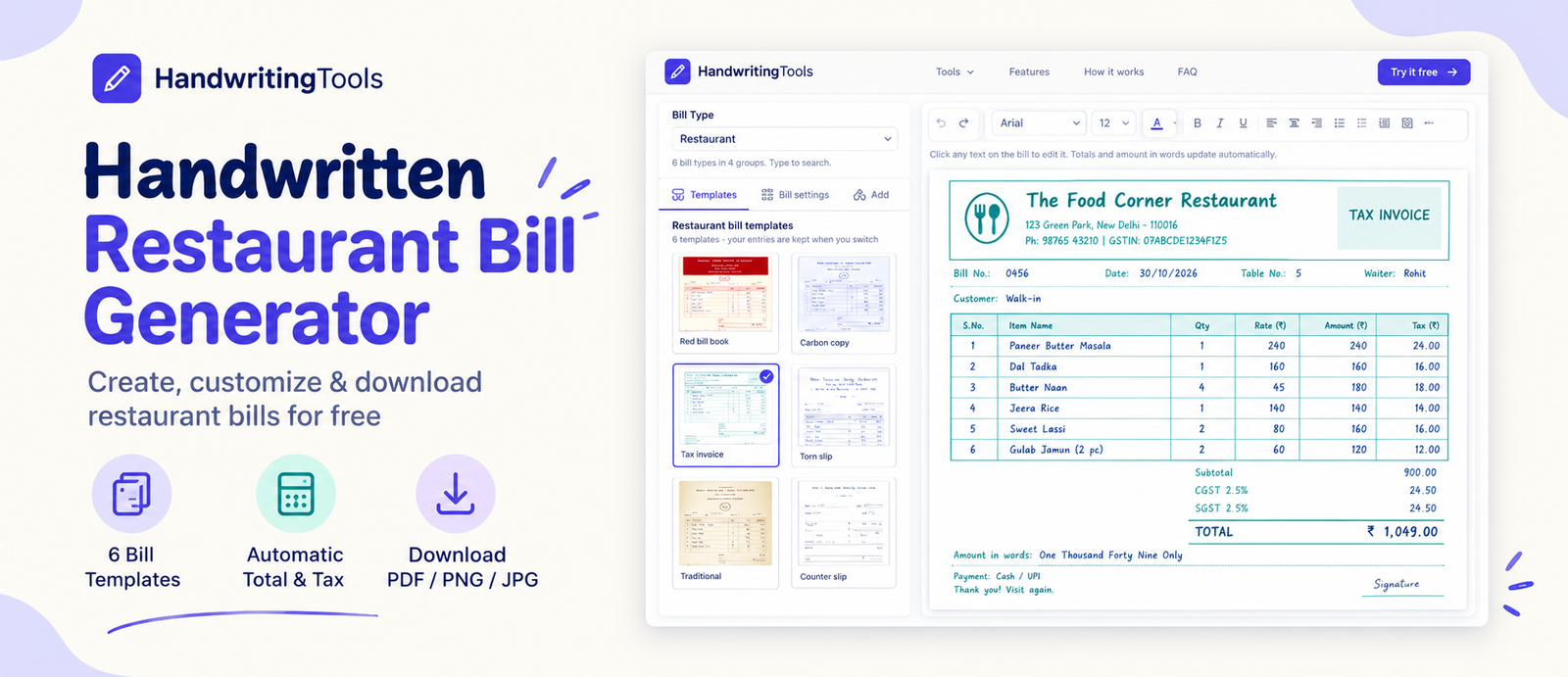
The Free Handwritten Restaurant Bill Generator by LeaveTrackr helps you create realistic handwritten-style restaurant bills directly in your browser. Choose a template, enter your restaurant details, add food items and prices, review the calculated totals, and download your bill as a PDF, PNG or JPG.
You can use the tool without signing up or installing any software.
Try it here: https://leavetrackr.com/tools/handwritten-bill-generator/restaurant
What Is a Handwritten Restaurant Bill Generator?
A handwritten restaurant bill generator is an online tool that lets you create a restaurant bill with the familiar appearance of a traditional bill book.
Instead of writing the restaurant name, order details, quantities, rates and total amount by hand, you enter the information digitally. The generator arranges the details into a bill layout and calculates the amounts for you.
LeaveTrackr's restaurant bill maker offers six templates with different styles, including traditional bill-book, carbon-copy, tax-invoice, torn-slip and counter-slip designs.
It combines the appearance of a handwritten restaurant bill with the convenience of digital editing. This makes it useful for restaurant owners, food-business operators, hospitality students and people creating restaurant design mockups.
Why Use an Online Restaurant Bill Maker?
Traditional restaurant bill books are familiar, but manually preparing each bill can take time, particularly when an order contains several dishes.
An online restaurant bill maker can simplify the process in several ways.
- Faster bill preparation: Enter the details of each dish without writing everything from scratch.
- Automatic calculations: Item amounts, subtotals, taxes, discounts and grand totals update as you edit the bill.
- Customizable templates: Choose a layout that matches the style of your restaurant.
- Clear itemized details: Display dish names, quantities, rates and amounts in an organized table.
- Digital downloads: Save your bill as a PDF, PNG or JPG for printing or sharing.
- Mobile-friendly access: Create bills from a compatible phone, tablet or computer.
- Free access: Get started without registration or watermarks.
The tool is especially useful when you need a straightforward handwritten-style document rather than a complete restaurant point-of-sale or accounting system.
How to Create a Handwritten Restaurant Bill Online
Creating a restaurant bill with LeaveTrackr is simple. Follow these steps to prepare your document.
Step 1: Open the Restaurant Bill Generator
Visit the Handwritten Restaurant Bill Generator in your browser.
Choose the restaurant bill type and explore the available templates to find a layout that suits your needs.
Step 2: Add Your Restaurant Details
Enter your restaurant name, address, phone number and other relevant business information.
You can also include details such as the bill number, date, table number, waiter name and customer information where appropriate.
If your restaurant is registered under GST, enter the correct GSTIN and other required tax details when preparing a tax invoice.
Step 3: Add Food Items and Prices
List each dish or beverage separately. Enter its quantity and rate so the customer can understand exactly what was ordered.
For example, a sample restaurant order might include:
- Paneer Butter Masala
- Butter Naan
- Jeera Rice
- Sweet Lassi
- Gulab Jamun
You can edit the existing sample text and add or remove item rows as required.
Step 4: Review the Calculations
The generator calculates item amounts and updates the subtotal and grand total as you make changes.
You can also configure relevant tax, discount and additional charge lines. The amount in words updates automatically, helping you produce a clear bill.
Always verify the applicable tax rate and review all figures before issuing a bill to a customer.
Step 5: Download or Print Your Bill
Once your restaurant bill looks correct, download it in PDF, PNG or JPG format.
You can print the document or share it digitally with the customer. PDF options include A4, A5 and thermal-printer sizes, making it convenient to prepare different bill layouts.
Create your restaurant bill for free: https://leavetrackr.com/tools/handwritten-bill-generator/restaurant/
Restaurant Bill Format: What Should It Include?
A clear restaurant bill format helps customers understand the order and verify the amount payable.
A typical restaurant bill includes the following information, depending on the transaction and applicable requirements.
1. Restaurant information: Name, address, contact number and relevant registration details.
2. Bill number and date: A unique bill number and the date of issue. Include the time where useful.
3. Table or order details: Table number for dine-in orders, or suitable order and delivery details for takeaway transactions.
4. Itemized food list: Each dish or beverage, its quantity, rate and line amount.
5. Subtotal: The total value of the items before applicable adjustments.
6. Discounts and additional charges: Show any discount or permitted charge separately and clearly.
7. Tax details: Include the applicable tax information where required. Registered businesses should follow the relevant invoice rules.
8. Grand total: Display the final amount payable clearly, including the amount in words when appropriate.
9. Payment information: Record the actual payment method, such as cash, card or UPI, where relevant.
10. Footer or signature: Add a suitable thank-you message, cashier details or business stamp if required.
The LeaveTrackr restaurant bill generator provides editable templates that help arrange these details in a familiar bill-book style.
Handwritten Restaurant Bill vs. Digital Restaurant Bill
A traditional handwritten restaurant bill is prepared manually on paper, while a digital restaurant bill is created using software or an online tool.
Both approaches have their place.
A handwritten bill may be familiar to customers and suitable for restaurants that prefer traditional bill books. However, manual calculations and handwriting can become inconvenient during busy periods.
Digital billing makes it easier to edit item details, calculate amounts and keep an electronic copy. It can also help reduce arithmetic mistakes.
LeaveTrackr combines these advantages by allowing you to enter details digitally and produce a handwritten-style restaurant bill.
However, this tool is not a replacement for a full point-of-sale system, inventory management software or accounting platform where those functions are needed.
Is This Restaurant Bill Generator Suitable for Small Businesses?
Yes. The tool is useful for several food-related businesses and educational purposes.
Small Restaurants and Family Eateries
Prepare itemized handwritten-style bills for genuine restaurant sales using a familiar bill-book layout.
Cafes and Food Stalls
Use an editable bill format for recording orders, beverages, snacks and other menu items.
Dhabas and Local Eateries
Create bills that resemble traditional restaurant paperwork without writing every item manually.
Takeaway and Food Businesses
Adapt the order details to suit genuine parcel or takeaway transactions, including relevant customer and packing information.
Hospitality Students
Practice preparing restaurant bills and learn how quantities, prices, subtotals and taxes are presented.
Designers and Developers
Create restaurant bill mockups for website demonstrations, application interfaces, educational projects and other design work. Clearly identify fictional examples as samples.
Restaurant Bill Format in Word or Excel vs. an Online Generator
Many people search for a restaurant bill format in Word or Excel because they want a ready-made template.
Word templates can be convenient for static documents, while Excel can support formulas and repeated calculations. However, users may need to adjust layouts, maintain formulas or format each document manually.
An online handwritten restaurant bill maker offers a different approach. You can edit the bill directly, use built-in calculations and download the result without managing a separate Word or Excel file.
If your business needs advanced reporting, sales reconciliation, inventory tracking or integration with payment systems, dedicated restaurant software may be a better fit.
Tips for Preparing Clear Restaurant Bills
A well-organized bill can reduce confusion and help customers understand their charges.
- Use the correct restaurant name and contact details.
- Match item names with the menu so customers recognize their orders.
- Enter the correct quantities and rates.
- Check discounts and calculations before issuing the bill.
- Show applicable taxes separately when required.
- Keep bill numbers organized and avoid accidental duplication.
- Record the actual payment method accurately.
- Retain business records in line with your accounting and legal requirements.
For restaurants in India, GST treatment depends on the business's circumstances and applicable rules. Verify the current rate, registration status and invoice requirements before using a bill for an actual transaction.
Is the Handwritten Restaurant Bill Generator Free?
Yes. LeaveTrackr's handwritten restaurant bill generator is available free of charge, with no sign-up or watermark.
You can choose from six restaurant bill templates, edit the contents, use automatic calculations and download the finished document as a PDF, PNG or JPG.
The tool works directly in your browser, so there is no need to install a dedicated application.
Create Your Restaurant Bill Today
Preparing a restaurant bill does not need to involve repetitive writing and manual calculations.
With the Free Handwritten Restaurant Bill Generator by LeaveTrackr, you can customize a restaurant bill, add your menu items, review the totals and download a handwritten-style document in minutes.
Whether you operate a small restaurant, cafe, dhaba or food stall, the tool provides a simple way to prepare clear bills for genuine transactions.
Ready to get started?
Visit https://leavetrackr.com/tools/handwritten-bill-generator/restaurant and create your first handwritten-style restaurant bill for free.
Responsible use: Create bills for genuine sales and services provided by your own business, or use the tool for practice, training and clearly identified design mockups. Do not create false bills or alter genuine transactions for reimbursement, insurance or tax claims.